
Bank Transfer Transition: FAQ
We’re introducing a major improvement to creator payouts. Creators will be able to receive payments using Bank Transfer (local ACH in the U.S. and local equivalent globally). This new option provides broader global coverage and a more streamlined setup experience for your creator community.
We’ll also be retiring PayPal as a payout option on March 2. Until then, creators who currently use PayPal can continue receiving payouts while they transition.
NOTE: Brands DO NOT need to take any action for creators to set up Bank Transfer as their payout method. The option will become available by default.
There are actions a Brand may take, but they are optional and depend on your preferences, and are outlined below.
Timing of Rollout
Bank Transfer availability will be rolled out in phases over a one-month period beginning December 15, 2025, and ending on January 19, 2026. PayPal will be fully retired on March 2.
You will be notified 1 week in advance that the functionality will be enabled for your account, making it available to your creators.
What Your Creators Will Experience
Creators will see Bank Transfer as a new payout method in their GRIN Payouts tab.
They can add their bank details at any time and set Bank Transfer as their active payout method.
Creators who have not added bank details will receive:
An initial notification when the Bank Transfer becomes available to them
Biweekly reminder emails until March 2, or until they complete their setup
In-app notifications throughout the transition period
We’ll provide creators with a help article that walks them through the switch step by step.
What Happens if a Creator Does Not Switch?
By March 2:
If they have no pending payments:
Their PayPal information will be removed. The next time a payment is issued, they’ll be notified to add their bank details to receive funds.If they have pending payments:
Any payments still pending on March 2 will be canceled and must be reissued once the creator completes their Bank Transfer setup.
Creators can update their payout method at any time, and the biweekly reminders stop once their Bank Transfer setup is complete.
What This Means for Your Team
No action is required on your part.
Your payout workflows remain the same. You will still be able to:
Issue payments as usual
See which creators have completed their payout setup
Communicate with creators directly if you choose to encourage an early transition (see below)
We’ll take care of the creator education, timelines, and notifications.
Brand workflows remain unchanged.
[OPTIONAL] Can I see or communicate with Creators who have not switched to Bank Transfer?
Viewing or contacting creators who have not yet made the switch to Bank Transfer can be done in the Contact >> Creators view, filtering by the Payment Account Status field.
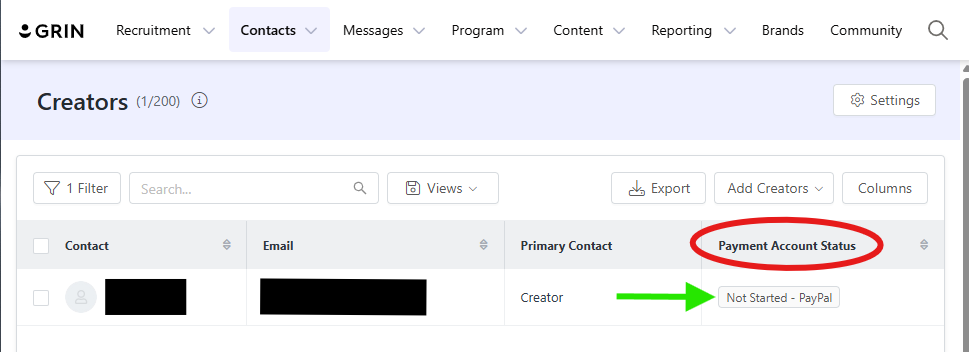
Create a Creator view with Payment Account Status visibility:
Click Contacts in the main Navigation to access the drop-down menu.
Select Creators
Locate and click the Columns button on the right
In the pop-up, choose the Available tab
Contact fields are selected by default. Locate the Payment Account Status field and check the box
Click Update Columns, which creates visibility into whether the creator has performed the update
To filter your new view to only those that still have PayPal set up:
Locate and click the Filter button on the left
For Filter Logic, select OR
Scroll to the bottom of the filter options, locate Advanced Filters, and click +Add Field
Use the Custom Field drop list to locate the Payment Account Status option and select it. Use the Select drop list and choose Active - PayPal
Add another value:
locate Advanced Filters again, and click +Add Field
Use the Custom Field drop list to locate the Payment Account Status option and select it. Use the Select drop list and choose Incomplete Tax - PayPal
If a creator has not yet set up a PayPal payment method and Bank Transfer has been enabled for your account, the creator will only see the option to set up Bank Transfer. You will not need to reach out to them, and doing so may cause unnecessary confusion.
Depending on what you would like to do with this list of Creators, you can choose to either Export, using the Export button, or Send Email button, available once you select your desired Creators.
Reminder: We’ll handle creator education, timelines, and notifications, but some brands will also want to reach out to their creators and provide their own guidance.
FAQs
Do we need to enable anything on our side?
No. Bank Transfer is enabled automatically.
Can we see which creators have completed their setup?
Yes—use the Payment Account Status column in nearly any page view where creators can be seen. The two most common are the Programs>>Payments area and the Contacts>>Creators area. Click the Columns button, Available fields, and in the Contact category choose Payment Account Status.
Can brands edit creator payout methods?
No. Creators manage their payout information directly.
Can we still message our creators about the change?
Yes, and doing so may speed up adoption, but it’s optional. GRIN will also run their own cadence and messaging to creators which cannot be turned off.
Do we need to take action on failed or returned payments?
Standard processes and procedures will still apply just like you are used to. If an error occurs due to incorrect bank details, creators will be prompted to resolve it.