
Downloading Subscription Invoices
Overview
You can access all past invoices for your GRIN subscription within your Account Settings page. You can also download your invoices if needed. You can review how to download your invoices below. Additionally, payment method management can be handled through an external portal accessible via your registered email address. Details on this process are elaborated further below.
Note: Any due invoices are emailed to the financial representative's email GRIN has on file for your account. To pay an invoice, you must follow the link in these emails.
Emails are sent from no-reply@ordwayplatform.com. You cannot pay invoices from the GRIN platform.
How to Do It
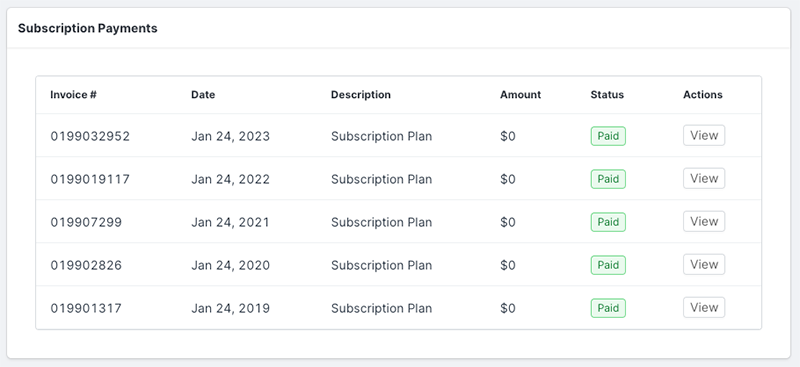
To access your invoices, log in to your GRIN account and navigate to your Account, then go to Settings, and finally to Subscription. This will open a table containing all your past invoices for your GRIN subscription.
Updating or Managing Payment Methods
To update your payment method or edit billing information, follow these steps:
Access Your Billing Portal: GRIN utilizes an external billing portal for managing payment information [located here: https://grin.ordwaylabs.com/portal/login]. Make sure you have access through your registered email address. If you do not have access, contact your account admin.
Update Payment Information: Once logged in to the portal, edit or update your payment methods as needed.
Note: Access to the external billing portal, such as the Ordway payment portal, may be required. If you experience access issues, contact GRIN support or your administrator.
The table has the following columns:
Invoice #: The unique number for your invoice. You can use this to reference the invoice with our Finance team if you have a question about the invoice.
Date: The date the invoice was issued.
Description: A description of what the invoice is for.
Amount: The amount due on the invoice.
Status: The payment status of the invoice.
Actions: Select View to download a PDF copy of the invoice. This copy has additional information about your subscription as well. For any issues accessing your invoices or if you require assistance, you can contact GRIN support or your administrator.